Maximize Social Media Success

Deliver digital marketing success: Steps PR professionals can take to maximize social media

Dux Raymond Sy (@MeetDux), PMP Managing Partner, Innovative-e

The presentation started out by talking about the recent “viral” phenomenon of “Gangnam Style” by the Korean artist Psy (if you’re not aware of it, see the video on the right).

We are in a social revolution, whether you like it or not. Here are 4 things that are happening today which will continue to increase:

  • BYOD – Bring your own device
  • Speed of Business
  • Do More w/ Less20121005-112355.jpg
  • Engagement

We’re moving from a transactional era, to one of engagement – it’s not social or traditional, it’s both.

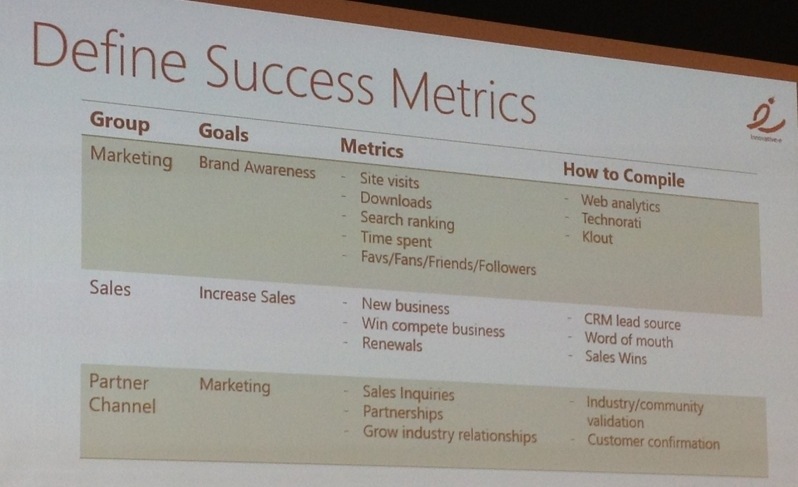
Define success criteria – Quantify the Value by the following steps:

  1. Identify the goal (i.e. engagement, build brand, sales, industry pulse)
  2. Cost considerations (i.e.Staffing, tools, advertisement)
  3. Return on Investment (i.e.thought leadership, sales, customer service)
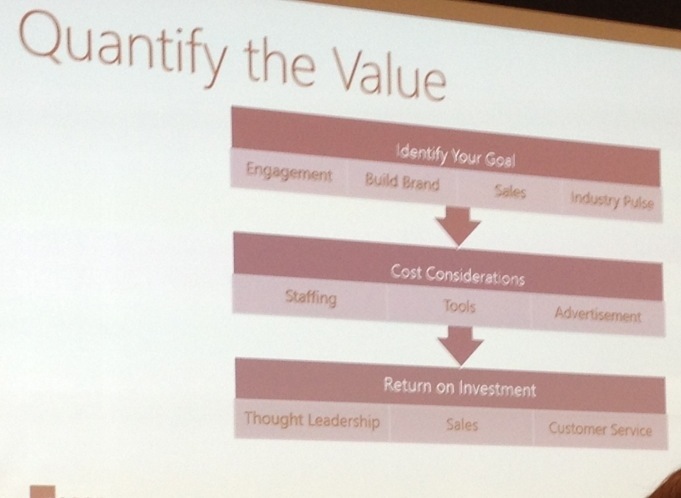
 

Then Integrate Business Strategy. (see image at right)
How not to be successful with social

  • Making it a corporate hobby
  • Purely selling vs engaging in social

Consistency is very important

  • It has to be part of your daily business
  • Scheduling social media activities helps a lot

Engagement must be both proactive and responsive.

Utilize Relevant Tools to Integrate and Synchronize:

  • Client apps – Hootsuite, Seesmic
  • Scheduling tools – socialoomph.com
  • Hashtags – Use and monitor these for relevant info.
  • Sharing tools – Bit.ly, RSS feeds (External RSS can feed into SharePoint)
  • Polls – Voting tool that works in PowerPoint – @votebytweet

Amplify

Maximize your “Echo” system – Influence influencers by connecting with them in social media

Big Finish by Dux…

Transform your corporate communications with SharePoint

Dux SyTransform your corporate communications with SharePoint Dux Raymond Sy (@meetdux), PMP Managing Partner, Innovative-e Dux, Author, “SharePoint for Project Management”

The #1 most used corporate communications tool is email – a 1973 technology – to facilitate corporate communications.

Why SharePoint?
The vision for SharePoint is that it democratizes productivity – it centralizes information, makes the right things available to the right people, and you don’t need IT’s help to do what needs to be done.

7 Ways to Maximize SharePoint for Corporate Communications

  1. Easily create a Collaboration Platform
    The best part of SharePoint is that you don’t need IT’s help to set it up.  The collaborative platform centralizes team artifacts (documents) and dialogue around projects.  In addition, SharePoint is connected to all the other tools people are already familiar with, including Outlook. For example, from Outlook, SharePoint calendars, documents, and other pieces are accessible and editable. You can actually use SharePoint without going to the project site, but just by working within Outlook.
  2. SharePoint transformEfficiently Manage Information
    With a centralized workspace, you can avoid playing “who saved the file last.”  In new versions of SharePoint, up to 4 people can work on a document simultaneously.  Version history, alerts, and organization manages records retention and allows users to customer how they want to work.
  3. Utilize Microsoft Office Integration
    Word, Excel, Outlook, Project, and other Microsoft products can sync files directly with SharePoint.  You can work with the tools you’re familiar with, and SharePoint simply helps connect and centralize the information. When everyone is working off the same set of information, you no longer have to take it all in and sort and combine data or information. For example, “Sync with Outlook” will move things like SharePoint discussions, documents, etc. to work with Outlook.
  4. Enhance Team Collaboration
    Two things can be used specifically to help team collaboration – Discussion Boards and Meeting Workspace.  Discussions are easy, and as mentioned, can be used just like email, by syncing with Outlook.  The meeting workspace provides a single place to store meeting information and record it.
  5. Effectively Automate Processes
    Common corporate communications processes and workflows are already in the tool out of the box – Approvals (stages/next steps or parallel), collect signatures, Disposition approval).  These are great for helping to document approvals, and ensure process and proceedures are followed.
  6. Generate Relevant Reports
    Sharepoint allows you to utlize the data within documents to build Dashboards with KPIs, charts, etc.
  7. Enable Mobile Access
    One Note – can be used to send things from a mobile device and then edit in Sharepoint.

How to Successfully Leverage SharePoint

Planning, executive support, educating your employees, and using the tools to solve problems is key.  SharePoint is more than just a glorified way to share and store documents, it’s a business enablement tool.  SharePoint has multiple capabilities, but you must take the approach of figuring out how to use it to solve your particular challenges.